Because I write about our experience owning EVs, I sometimes get a query “over the transom” as we say, asking for help or for an explanation.
Recently I got a query from someone who just bought a 2027 Bolt. It wasn’t just a new car to them, it was their first EV. They were a “newbie” to all the tech features of their new car and to EVs in general.
Here are some general tips that have worked for me as well as my answers to her specific questions.
Some Tips for Newbies
If it’s your first EV or if it’s a brand new car period there’s a lot to learn. Most new cars and EVs especially are “software defined vehicles.” It can be overwhelming when you first turn the car on and you hear a confusing series of beeps, buzzes, and chimes. Then there’s a big touch screen display with rows of unknown icons staring you in the face.
Don’t panic. You probably felt the same way when you opened your first smart phone. Take a deep breath, relax, and think to yourself, “I’ve been around the block a few times. I can figure this out in due time.” And that’s the key. Take your time.
I am experienced with EVs, and I am forced to do this every time I buy a new car. Sometimes I don’t figure it out on the first try. I stop, then go do something else, and come back at the problem another day. Often that’s what it takes. You’re brain processes all the instructions differently and you figure it out.
It’s taken me nearly six months to get all the features of the 2027 Bolt working the way I want and I am the kind of person who reads—skims more likely—the 315-page manual.
There’s a wealth of information on line. Use it. Google your question or problem and see what pops up. I had a technical issue, a very nerdy one, and couldn’t figure it out. I mentioned it on the Chevy Bolt forum (www.chevybolt.org), where there are some very experienced and knowledgeable users. One user who is familiar with modern software and the Bolt explained to me what I needed to do. Bang. That was it. I tried what he suggested and it worked immediately!
The Newby’s Questions
A. One day I found that my unplugged Bolt, sitting in my garage was charging! It took me from 58% to 65% before I was able to stop the charge on my Chevrolet App. I saw the address listed was my neighbor’s address. She has a plug in hybrid. My point is that now I’ll never be able to actually charge to 100%. SO…What about my BATTERY HEALTH?
1. Yes, you can still charge it to 100% and in fact you should. That in fact resets the battery software when you do charge it to 100%.
2. There may be some issue with the MyChevy app. For now don’t worry about it. You don’t need it to use the car normally.
3. Since I wasn’t there to observe the behavior I can’t really comment on the charging without being plugged in. For now, just use the car normally. Charge to 100% every week as instructed.
4. Don’t worry about battery health. It’s not a problem. I’ve driven 5,000 miles and battery health hasn’t budged from 100%. And yes, I check the screen on the center console and I check inside the car’s computer too. They are both the same–as they should be.
B. After a trip and turning off my Bolt in my garage, sometimes my Bolt seems to surge. The headlights are on and it seems to be racing rather than stopping. At other times it just shuts off with no surging/no headlights. This is after returning home from the same place, at the same daytime temperature with the same driver…me. What’s happening?
1. There are pumps and valves that make odd noises when the car is turned off. My wife noticed this. It’s normal, annoying yes, but normal.
2. Yes, if you have the keys, whenever you walk by the car, the car wakes up like a dog hoping for a walk. Again, annoying, but that’s the way it was designed. That’s the default. For several months I would leave my keys in the house until I wanted to go some where. Then I learned you can turn this feature off by paging down through the Settings menus (Settings>Vehicle>Lighting>Vehicle Locator Lights>Off). That’s what I did and now the car works like normal.
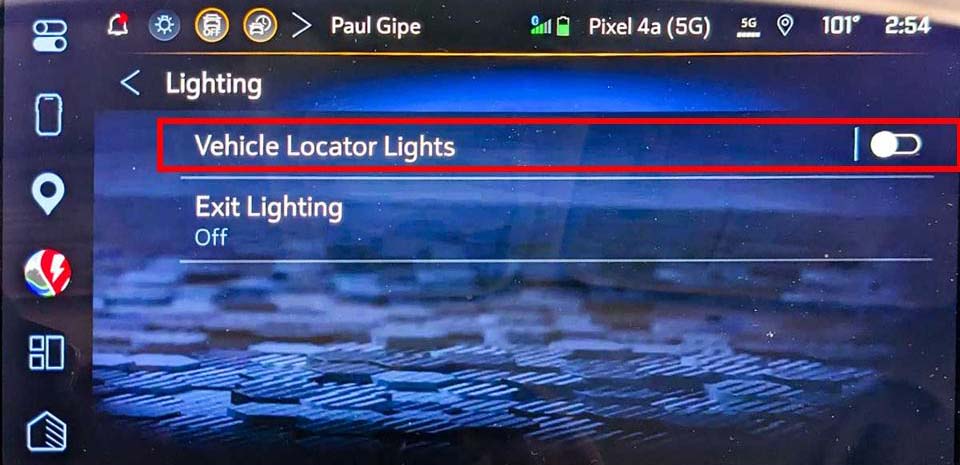
3. If you don’t think the car is turning off after you open the door and walk away, you can use the “off button” on the center console at the top of the screen. There are several “buttons” there. One is “off.” You press it and press off again and the car goes off. There is another button there and that button leaves the car on for 60 minutes so be sure you press the right one.
C. My drivers’ seat is heating up! I don’t know about the passenger’s seat. I’m in Tucson, Arizona where it’s 109F and there is no indication that the heated seats are turned on.
1. If the heated front seat is on, there will be red light on a switch that’s on the left side of the climate buttons. Press it to turn the seat off. If that doesn’t work, tell the Chevy technician when you take the car in. They should help you and if it doesn’t turn off they can fix it.
More Tips
For more tips on adapting the 2027 Bolt to your needs, see 2027 Chevy Bolt June Update and Solutions to Annoying Issues.
